๐Ÿงพ DIAN e-invoicing ๐Ÿ”— Integrates MAX ERP & Dynamics GP โšก Built for any ERP

From inbox to ERP, without touching a PDF

QFLOW automatically captures electronic invoices from your mailbox, reads their XML, validates them against your purchase orders and receipts, and sends them to your ERP in seconds. Your team reviews; it no longer keys in data.
qflow.qanttic.com
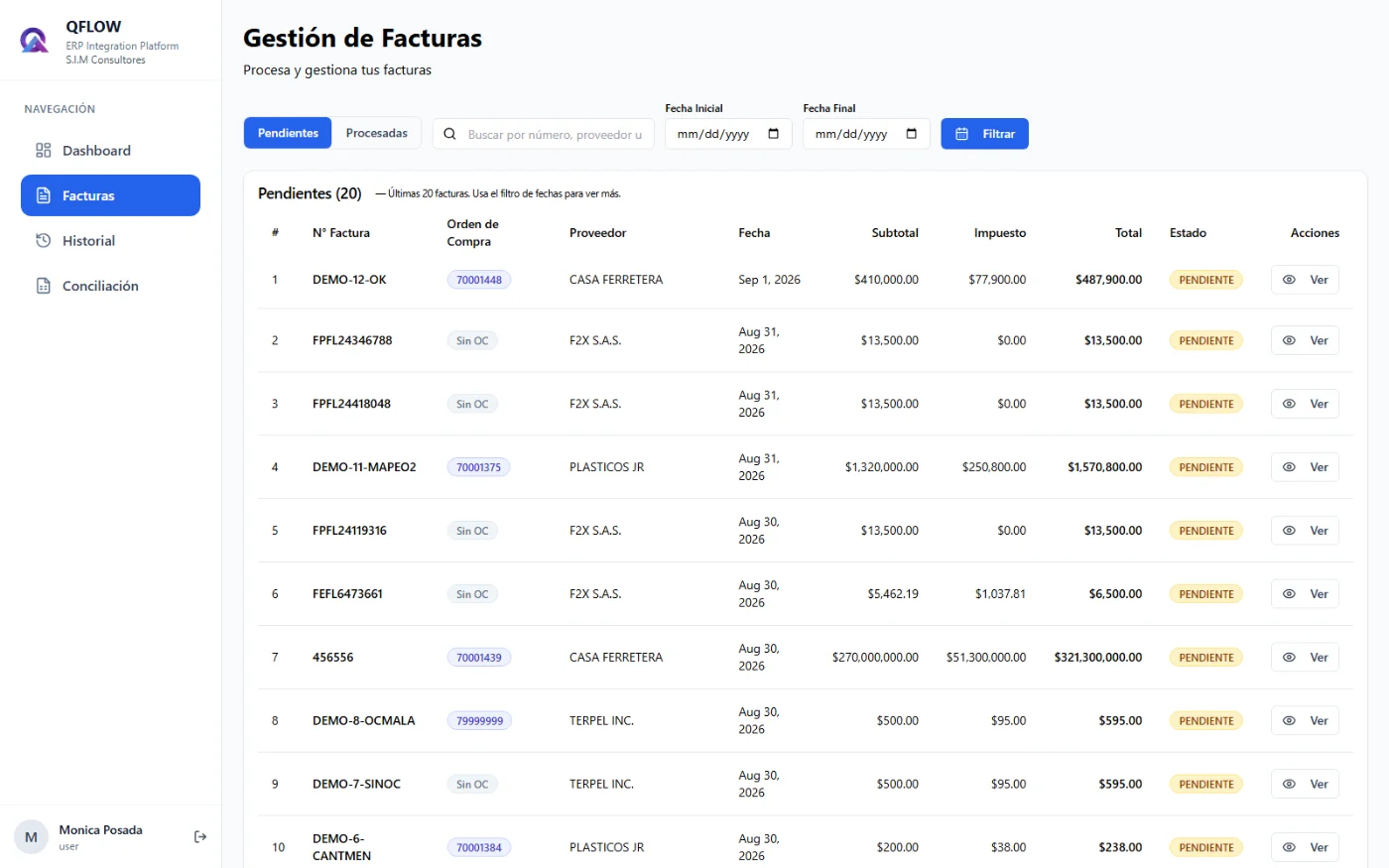
QFLOW pending invoices list
100%
Automatic capture from email
10
Controls that block a faulty send to the ERP
0
Invoices keyed in by hand
15 s
Per invoice with QFLOW, versus ~8.5 min by hand

Three risks your team faces today

The manual process of receiving and booking invoices has concrete failure points. QFLOW removes them.

Risk 1 ยท Email as an accounting inbox

Invoices get lost, errors slip through

Today your team checks the inbox by hand, spots the invoices and re-keys them into the ERP one by one. Every step is a chance for something to go wrong.

  • An invoice arrives on a Friday night. On Monday it is nowhere to be found. Nobody saw it.
  • While typing, a digit is wrong. The mistake only shows up at reconciliation.
  • With high volume the team cannot keep up and invoices pile up.
HOW QFLOW SOLVES ITIt captures every invoice from email, presents it for review and approval, and sends it to the ERP without anyone touching a number.
Risk 2 ยท PDF vs. XML

Two documents, one risk

Every electronic invoice comes as two files: the PDF your team reads and the XML DIAN processes. If the data does not match, your books will not match DIAN either.

The PDF says$1.000.000
The XML says$1.100.000

Which one did you book in the ERP? DIAN validates against the XML; spotting the gap by hand means reading XML, and nobody has time for that.

HOW QFLOW SOLVES ITIt reads the XML automatically and shows the structured data on screen. What your team approves, and what goes to the ERP, always comes from the XML, not the PDF.
Risk 3 ยท Lost time

Hours of your team spent on work that adds no value

Finding the email, downloading the ZIP, splitting out the PDF and keying in the data takes about 8.5 minutes per invoice. For a company processing around 250 supplier invoices a month, that is roughly 35 hours of administrative work every month, time that also carries the risk of errors and missed documents.

HOW QFLOW SOLVES ITIt reads the emails, downloads and centralises the documents and extracts the data, at about 15 seconds per invoice. Your team gets that time back for higher-value work.
Manual process8.5 minper invoice
With QFLOW15 sper invoice
250 invoices a month~35 hof manual work
250 invoices a month~1 hwith QFLOW
Estimate for an example of 250 monthly invoices; actual savings depend on your volume and current process.

Four steps, zero keying

Your suppliers keep sending invoices to the same inbox. QFLOW does the rest.

1

Reads the mailbox

It monitors the mailbox and captures the messages carrying the electronic invoice ZIP, whenever they arrive.

2

Extracts the data

From the XML it pulls supplier, number, date, purchase order, line items, taxes and amounts.

3

Your team reviews

The invoice shows in the list with its PDF beside it to confirm the extraction is right.

4

Enters the ERP

It is validated against the purchase order and receipts and sent to the ERP in one click, already reviewed.

See what it really does

Real platform screenshots, not mockups.

01

Your accounting inbox

Every electronic invoice received, organised and ready to process. Number, purchase order, supplier, date, amounts and status at a glance.

  • Pending and processed kept apart, with no ambiguous states
  • Search by number, supplier or purchase order
  • No spreadsheets. No manual inbox hunting
qflow.qanttic.com
Invoice management in QFLOW
qflow.qanttic.com
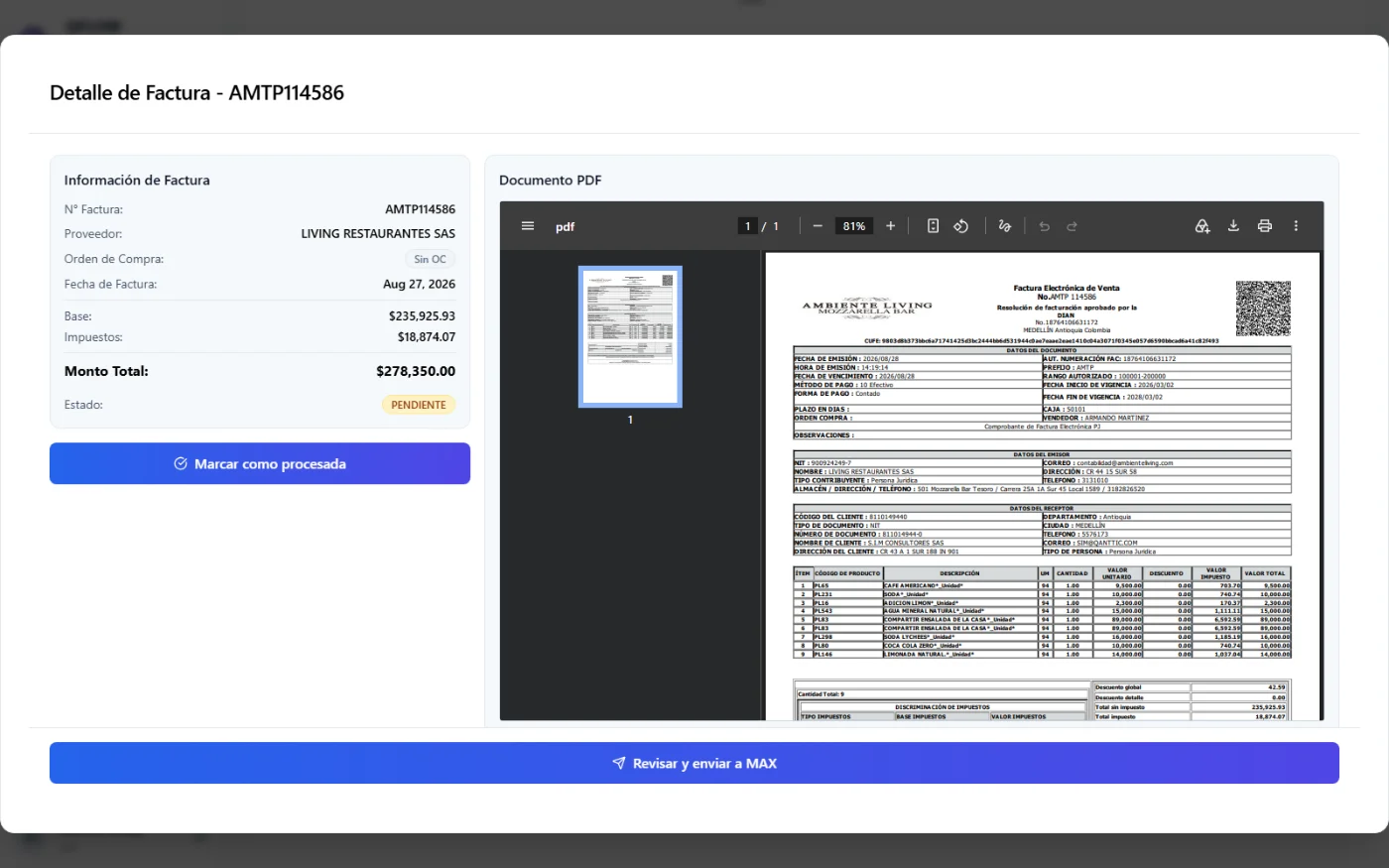
Invoice detail with the PDF alongside
02

Data and official document, side by side

Open any invoice and see the original document next to the structured data: net amount, taxes, total and supplier, with line-by-line detail.

  • No manual PDF or XML downloads
  • Automatic warning when the lines do not add up to the invoice total
  • QFLOW makes nothing up: everything comes from the supplier document
03

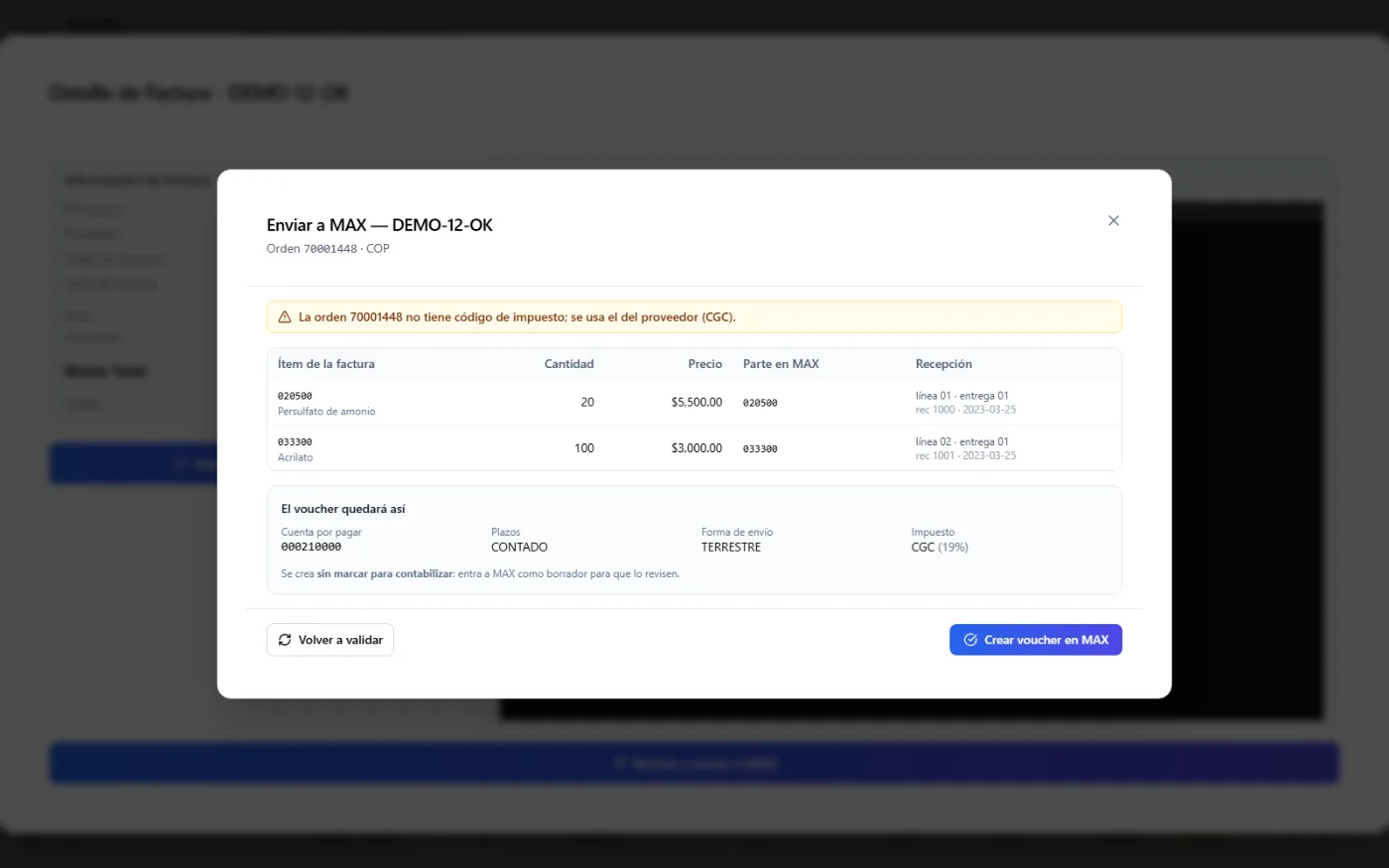
Check against the ERP before a single line is written

Sending to the ERP is never blind. QFLOW queries your ERP live and shows which part and receipt each line maps to, and how the voucher will look, before creating anything.

  • The query creates or changes nothing in the ERP
  • The voucher arrives as a draft: accounting reviews and posts it
  • Billed receipts are flagged: the same delivery cannot be charged twice
qflow.qanttic.com
Review before creating the voucher in the ERP
qflow.qanttic.com
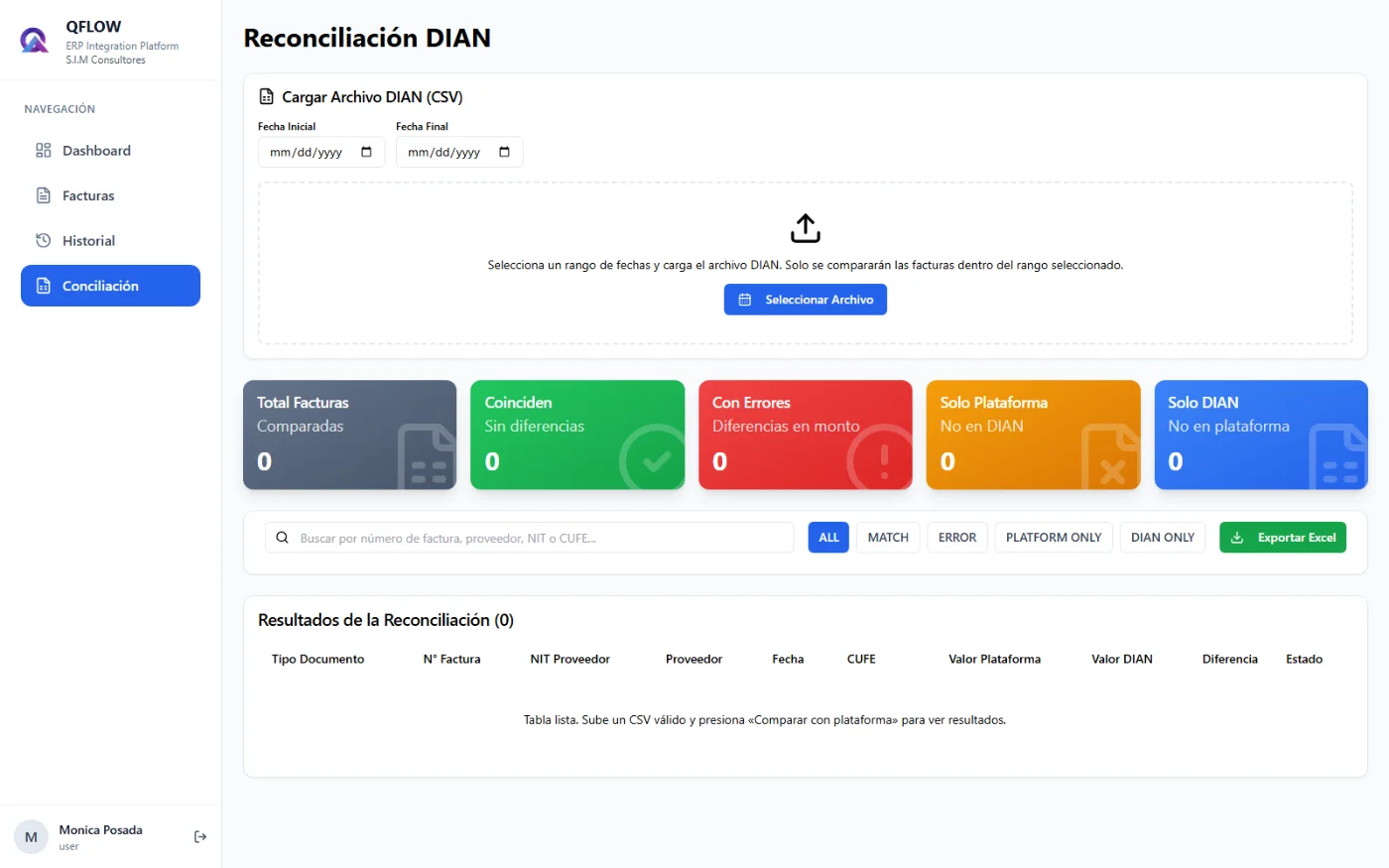
DIAN reconciliation in QFLOW
04

DIAN reconciliation, automated

Upload the received-documents file DIAN generates and QFLOW compares it against your invoices. It answers one question: do I have everything DIAN says was invoiced to me?

  • Accepts .xlsx, .xls and .csv exactly as DIAN delivers them
  • Matching, amount differences, platform-only or DIAN-only
  • Export the result to Excel

A wrong invoice never reaches your ERP

Before sending, QFLOW cross-checks each invoice against the purchase order and receipts. Blockers stop the send; warnings let you decide with the facts in front of you.

Blocker Stops the send

Examples of what QFLOW stops
  • Invoice with no purchase order, or with a non-existent one
  • Purchase order that belongs to another supplier
  • Invoice or CUFE already booked (double entry)
  • Items with no mapping or no pending receipt
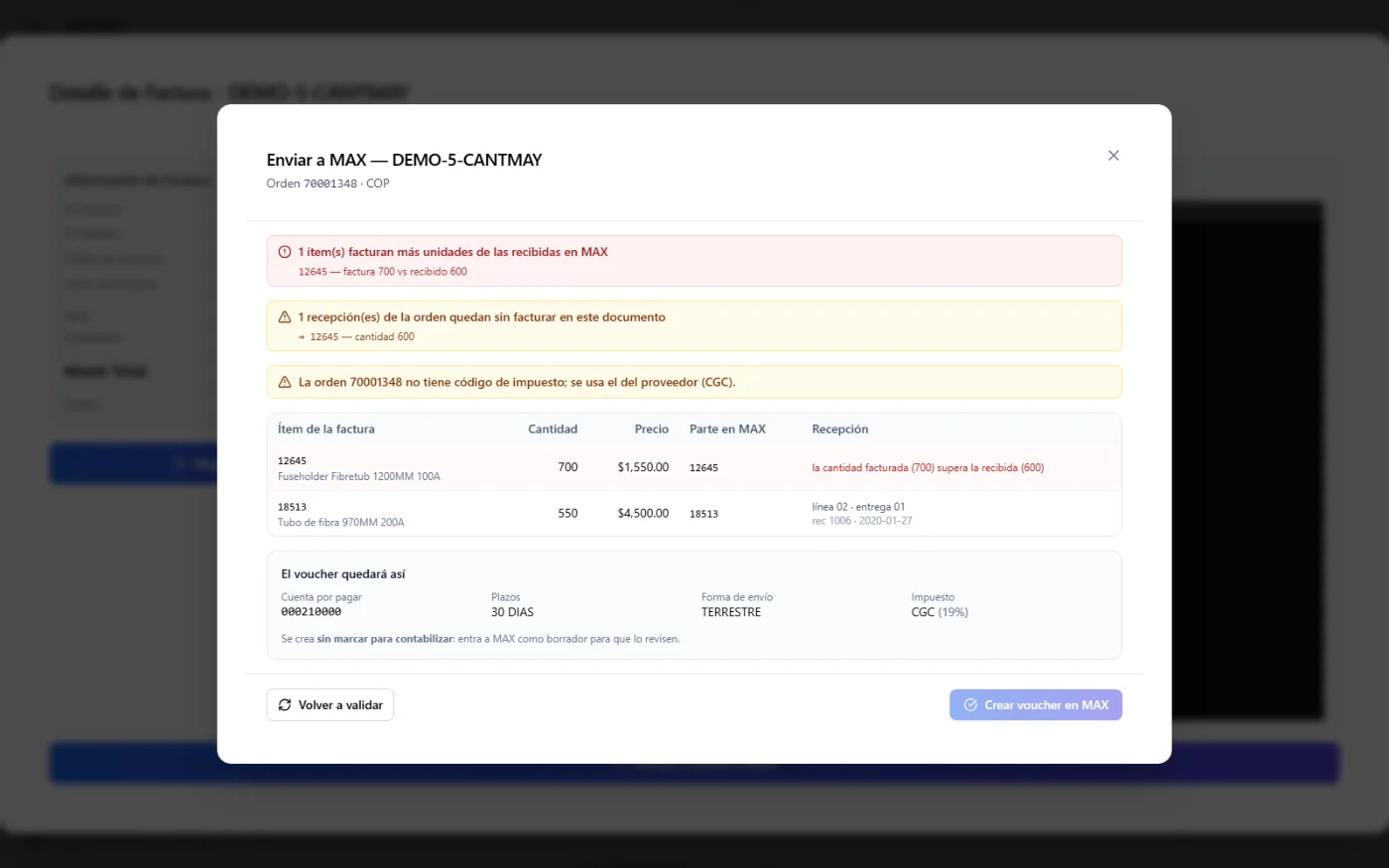
  • Billing more than was received

Warning Lets you decide

Examples of what QFLOW flags
  • Price differs from the purchase order
  • Partial invoice: billing less than received
  • VAT does not match what the ERP calculates
  • Inactive supplier or tax without a code
  • Order receipts that remain unbilled
qflow.qanttic.com
QFLOW blocks an invoice billing more units than were received

Real example: the invoice charges 700 units and the ERP only received 600. QFLOW blocks the send before you pay for goods that never entered inventory.

The whole cycle. One platform.

Every function was designed around the real Colombian accounting workflow.

๐Ÿ“ฅ

Email capture

Monitors your mailbox and captures every electronic invoice automatically. None gets lost.

๐Ÿงพ

Invoice management

List, filter and look up invoices with line detail, supplier, taxes and status.

๐Ÿ”—

ERP integration

Direct send to MAX ERP and Dynamics GP, with no middlemen. Custom connectors for other ERPs.

๐Ÿ›๏ธ

DIAN reconciliation

Compares what DIAN reports against what you hold in the platform and exports the differences.

๐Ÿ“Š

Real-time dashboard

Invoices for the month, pending and processed, with monthly charts on the home screen.

๐Ÿ—‚๏ธ

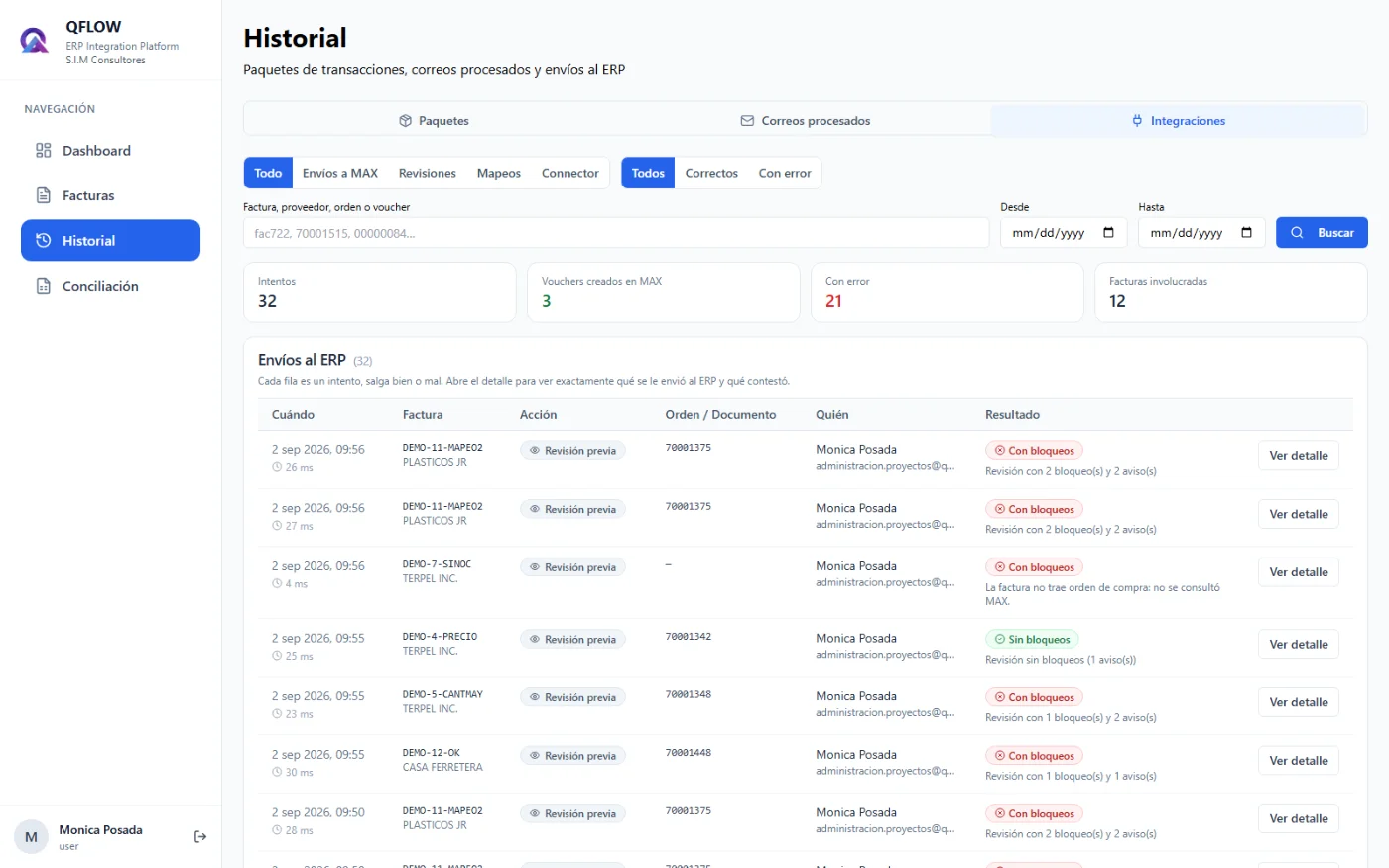
History and audit trail

Log of emails read, ERP send log and traceability of every operation.

qflow.qanttic.com
ERP send log in QFLOW

Every send attempt is on record, failed ones included, with full detail.

Works with your ERP

QFLOW does not force you to change systems. It connects to the one you already use.

โœ“ Integration available

MAX ERP

Validation against purchase orders and receipts, and voucher creation as a draft.

โœ“ Integration available

Microsoft Dynamics GP

Supplier invoices sent straight into your Dynamics GP accounting.

โšก Custom
๐Ÿ”Œ

Any other ERP

QFLOW was designed with a connector architecture to integrate with whichever ERP you use.

The process that takes hours today takes one click tomorrow

โœ“

100% invoice capture

No invoice gets lost. QFLOW monitors your mailbox and captures every one, whenever it arrives.

โœ“

Your team reviews, not keys

Hours of keying are freed up and transcription errors disappear.

โœ“

Your books match DIAN

The XML is the source of truth and reconciliation catches any gap.

โœ“

Control before paying

Avoid paying for goods that never entered inventory, duplicate invoices and unagreed prices.

โœ“

Full traceability

History of emails, invoices and ERP sends for audit.

โœ“

Accounting stays in charge

QFLOW never posts on its own: the document enters the ERP as a draft for review.

QFLOW is part of the Qanttic Smart Factory Suite, alongside MAX ERP, QMES and QVisual.

Questions about QFLOW

What is QFLOW and what problem does it solve? +
QFLOW is the Qanttic platform that automates the intake of supplier electronic invoices. It monitors the company mailbox, captures each invoice, reads its XML, presents it for review and sends it to the ERP with no manual keying. It removes invoices lost in email, typing mistakes and mismatches between what the PDF says and what the tax authority (DIAN) receives.
Which ERP systems does QFLOW integrate with? +
Today QFLOW is integrated with MAX ERP and Microsoft Dynamics GP. It was also designed with a connector-based architecture so it can integrate with any other ERP. If you run a different system, tell us which one and we will assess the connector in a sales meeting.
Does QFLOW read the invoice XML or the PDF? +
QFLOW reads the XML, the document DIAN actually processes, and displays the structured data next to the original PDF so your team can verify it visually. What gets approved and what travels to the ERP always comes from the XML, so your books match what DIAN has on record.
What checks does it run before sending an invoice to the ERP? +
It queries the ERP live, without creating or changing anything, and checks that the purchase order and supplier exist, that the order belongs to that supplier, that the invoice or CUFE has not already been booked, that there are receipts to bill and that you are not billing more than was received. Blockers stop the send; warnings (price differences, VAT mismatch, partial deliveries) are shown so the user can decide with the full picture.
Does QFLOW post invoices automatically? +
No. QFLOW never posts anything on its own. In the MAX ERP integration, the voucher is created unmarked for posting: it lands in the ERP as a draft for accounting to review and post when appropriate. Billed receipts are flagged so the same delivery cannot be charged twice.
How does DIAN reconciliation work? +
You download the received-documents file from DIAN (.xlsx, .xls or .csv), upload it to QFLOW with a date range, and the platform compares it against your invoices. It shows which ones match, which have amount differences, which are only in the platform and which are only in DIAN, and you can export the result to Excel.
How do invoices get into QFLOW? +
Your suppliers keep sending the electronic invoice to the company email, as they always have. QFLOW monitors that mailbox, identifies the messages carrying the electronic invoice ZIP and processes them automatically. Nothing changes in how you work with suppliers.
How is it implemented and how can I see a demo? +
Book a meeting with our sales team. We show you QFLOW with real invoices, define the scope based on your ERP and invoice volume, and take care of configuring the mailbox, the ERP connection and the users.

Your expenses up to date. Accurate, fast and effortless.

Book a demo and watch QFLOW process real invoices, connected to your ERP.

โœ“ Demo with real invoices
โœ“ Integration with your current ERP
โœ“ Setup handled by Qanttic

comercial@qanttic.com ยท +57 314 810 4022

Complete your operation with these solutions